An AI agent that runs on Google Cloud, for example on Cloud Run or in Vertex AI, acts through a service account. The service account is a non-human identity: no person signs in with it, but it holds IAM roles, and the agent can do whatever those roles allow.
The short answer: give each agent its own service account, attach it to the workload instead of creating a key, grant narrow roles on specific resources, and restrict who may impersonate it. Google's own guidance points the same way, and the sections below show where agents most often end up with something broader.
In this piece, we will cover:
- Which identity an agent gets by default
- Keys, attached accounts, impersonation and federation compared
- Why default and shared accounts are a problem
- What to review, and where nerl0 fits
Which identity does an agent get by default?
It depends on the service. According to Google Cloud documentation, if you do not specify a service account when you create a Cloud Run resource, Cloud Run uses the Compute Engine default service account. Google describes this as a default service account: a user-managed account that is created automatically when you enable certain services, and that you are responsible for managing.
The catch is the role. Google says the Compute Engine and App Engine default accounts can receive the Editor role on the project, which allows broad read and write access. Google strongly recommends disabling that automatic grant with an organization policy, and notes that organizations created after May 3, 2024 have it enforced by default. It does not remove Editor from accounts that already have it. If you run an agent on such an account, the agent can change much more than its task needs.
Google also notes that Google Cloud services use service agents, not your default service accounts, to reach your resources. So the broad grant is a convenience, not something the platform depends on.
Keys, attached accounts, impersonation, federation: what is the difference?
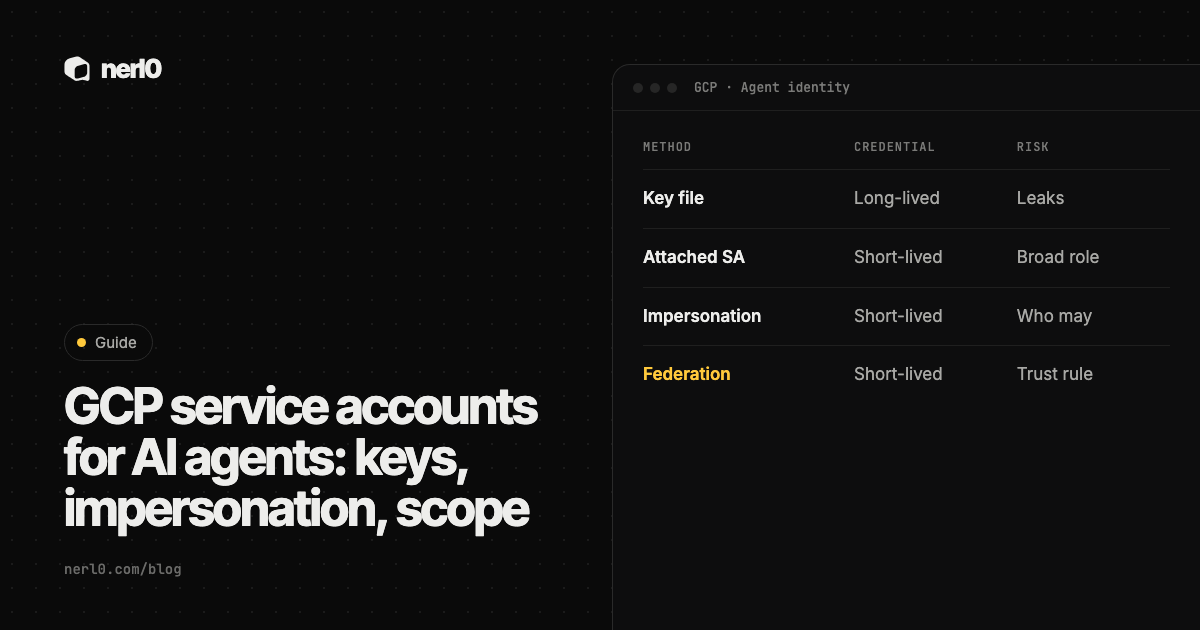
There are four common ways for an agent to authenticate as a service account. The table compares them using Google's descriptions.
| Method | How the agent gets a credential | Main risk to review |
|---|---|---|
| User-managed key | A key file is created and used to sign a token request | The key is a bearer credential. It has no expiry by default and can leak |
| Attached service account | The account is attached to the workload, and the platform supplies short-lived credentials | The account's roles are too broad, or someone can run code as the workload |
| Impersonation | An authenticated principal acts as the service account with its permissions | Who holds the permission to impersonate, and at what level |
| Workload Identity Federation | An external workload trades its own identity provider credential for a short-lived token | What the federated identity is allowed to reach or impersonate |
Why does Google advise against service account keys?
Google's overview calls service account keys a security risk if not managed correctly, and tells readers to choose a more secure alternative whenever possible. Its key guidance lists credential leakage, privilege escalation and information disclosure among the risks, and notes that keys are attractive to attackers because they are not subject to extra sign-in checks such as 2-step verification.
Keys have no expiry by default. Google suggests expiry for temporary needs, but advises against it for production workloads, because an expired key can cause an outage. The recommended control is policy: apply the constraints that disable key creation and key upload at the organization root. Google says organizations created on or after May 3, 2024 have these enforced by default, and that you should override them only for projects that truly need keys.
For an agent this matters more than for a classic app, because a key file can end up wherever the agent's code, configuration or tools go. Google advises keeping keys out of source repositories and not setting the GOOGLE_APPLICATION_CREDENTIALS environment variable on Cloud Run, where a user-managed service account should be used instead.
How does impersonation work, and why is it risky?
Impersonation lets a user or another service account act as a service account. Google lists uses such as testing whether a set of permissions is enough and developing locally against an app that only runs as a service account. It advises caution when granting impersonation of highly privileged accounts, such as default service accounts.
The best-practices page names four roles that can enable privilege escalation: Service Account User, Service Account Token Creator, Service Account Key Admin and Service Account Admin. Google's advice is not to grant them at project or folder level, because that lets a principal impersonate every service account in scope. Grant them on one service account at a time. It also recommends enabling data access logs for the IAM and Security Token Service APIs so that impersonation and token requests are recorded.
What about agents outside Google Cloud?
Workload Identity Federation covers workloads that run elsewhere. Google says it supports AWS and Azure workloads, deployment pipelines such as GitHub and GitLab, and any OpenID Connect or SAML 2.0 provider. The workload presents a credential from its own identity provider to Google's Security Token Service and receives a short-lived token, so no key has to be issued, stored or rotated.
There are two ways to grant access afterwards. You can give roles straight to the federated identity on a resource, or let the federated identity impersonate a service account through the Workload Identity User role. Either way, the access that results is the thing to review.
What happened when a default agent identity was too broad?
Palo Alto Networks Unit 42 published research on March 31, 2026 about Vertex AI. It reported that the Per-Project, Per-Product Service Agent attached to a deployed agent had broader permissions than needed by default. Using them, the researchers obtained credentials for the Vertex AI Reasoning Engine service agent, read Cloud Storage data in the consumer project and downloaded restricted container images from Google-owned repositories.
According to Unit 42, Google responded by updating its Vertex AI access-control documentation and recommending Bring Your Own Service Account, which replaces the default service agent with a dedicated, least-privilege account. Google also told Unit 42 that controls prevent the service agent from modifying production images. The lesson for any agent platform is the same one OWASP states under excessive agency: limit the permissions an agent's identity holds on downstream systems to the minimum, and enforce authorization in those systems rather than trusting the model.
What should you review for each agent?
- Which service account does the agent run as, and is it dedicated to this agent? Google advises one account per application to limit blast radius and keep audit logs traceable.
- Does the account hold Editor or another broad role? Replace it with specific roles on specific resources, and use role recommendations to find unused permissions.
- Does any key exist for it? If so, who created it, where is it stored, and can the key creation constraint be enforced instead?
- Who can impersonate it, or act as it by running code on the workload? Check the four impersonation roles at each level of the hierarchy.
- Is it still needed? Google advises disabling unused accounts first and deleting them later.
This guide covers identity and permissions, not whether an agent's code, prompts or tools are safe. It also does not describe every Google Cloud service: the Vertex AI details come from Unit 42's research and Google's response as reported there, and current defaults may have changed since. Check Google's documentation for the service you use.
Where nerl0 fits
The review above is an inventory question: which service accounts exist, what each can reach, and who owns them. nerl0 maps every AI agent and non-human identity and what each can reach. The service accounts page is where that view starts for this kind of identity, and the piece on non-human identities explains the term.
nerl0 connects read-only through each platform's own interfaces and reads configuration and permission data, never the contents of data stores. The Connectors page shows how that connection is set up, and read-only by default explains why it is built that way. The Security Graph then shows authority paths, from agent through credential and role to a crown-jewel data store, where every step is an observed relationship. See how to read the Security Graph.
Issues carry severity, evidence, an owner and a recommended breakpoint, and the next scan verifies the fix. Every answer states what it cannot show, and a path is a route, not proof that the agent used it.
The same questions apply on Microsoft Azure: see Azure identities for AI agents.
Summary
An agent on Google Cloud is as powerful as its service account. Give each agent a dedicated account, attach it instead of creating keys, use federation for workloads outside Google Cloud, and grant impersonation per account and sparingly. Replace default accounts and broad roles such as Editor with narrow ones. Then review the accounts regularly, because roles, owners and attachments change.
Sources
- Best practices for working with service accounts, Google Cloud, accessed Oct 14, 2026
- Best practices for managing service account keys, Google Cloud, accessed Oct 14, 2026
- Service accounts overview, Google Cloud, accessed Oct 14, 2026
- Cloud Run service identity, Google Cloud, accessed Oct 14, 2026
- Workload Identity Federation, Google Cloud, accessed Oct 14, 2026
- Double Agents: Exposing Security Blind Spots in GCP Vertex AI, Palo Alto Networks Unit 42, accessed Oct 14, 2026
- LLM06:2025 Excessive Agency, OWASP GenAI Security Project, accessed Oct 14, 2026
Sascha writes about what AI agents and non-human identities can reach, and builds nerl0 to keep that visible.